Skip to content

Blog

Toast modifier sales report cleanup in Excel

Modifier cleanup is not just deleting blank rows. The goal is a table where each modifier remains traceable to its source and its parent item—or is clearly marked for review.

The problem

Toast modifier data can contain repeated names, zero-priced choices, paid add-ons, special requests, voids, malformed values, and parent IDs that do not exist in the chosen item file. Removing “messy” rows can make totals look neat while destroying the audit trail.

Example Toast CSV columns

business_date,parent_item_selection_id,modifier_group,modifier_name,quantity,net_price,voided
2026-06-22,item-204,Cheese,Extra cheese,1,2.00,false
2026-06-22,item-999,Add-ons,Avocado,1,2.50,false

Keep these cleanup columns beside the normalized values:

  • source filename;
  • source row number;
  • parent match status;
  • parse warning;
  • voided status;
  • review note.

Cleanup sequence

  1. Preserve the untouched CSV.
  2. Normalize whitespace without changing the source field.
  3. Parse quantity and currency explicitly.
  4. Keep zero values distinct from blanks and invalid text.
  5. Check whether each parent ID matches exactly one Item Selection.
  6. Mark unmatched and ambiguous relationships.
  7. Keep voided rows visible.
  8. Build modifier frequency and value summaries from reviewed rows.

Do not deduplicate repeated modifier names automatically. Two “Extra cheese” rows may represent two deliberate selections.

Screenshot and demo
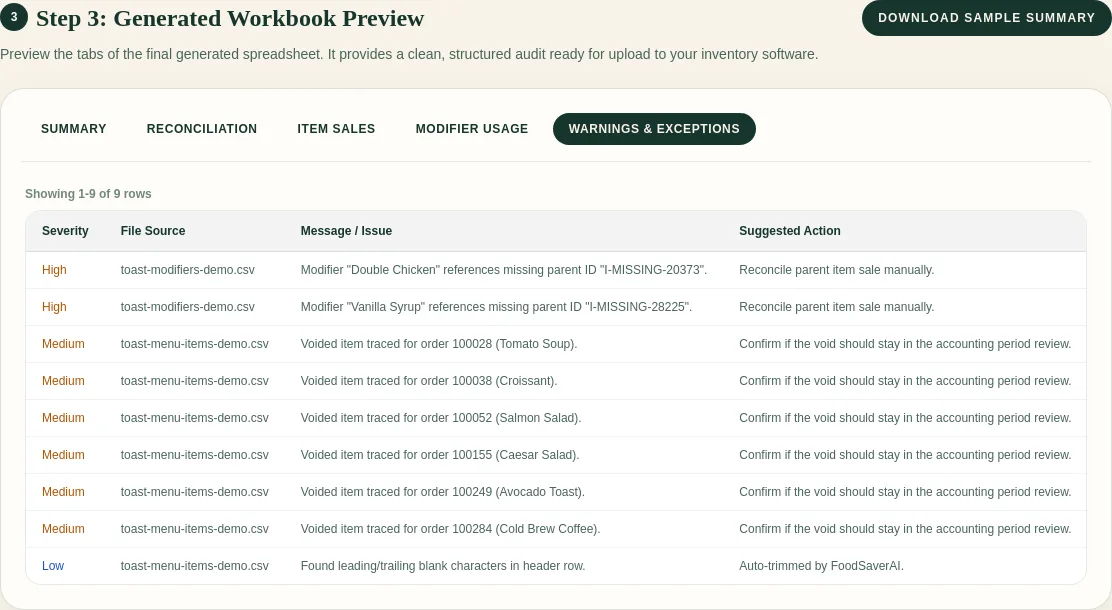
FoodSaver workbook preview showing unmatched and voided rows

The exception sheet is part of the deliverable, not a failure screen.

Free sample workbook

Use the synthetic item-999 row to test how your process handles an unmatched parent.

Pricing

Generate up to three successful workbooks per UTC day for free within the free limits. Pro is $19/month or $190/year and adds larger limits, saved mappings, history, email delivery, and 90-day retention.

Compare plans.

Frequently asked questions

Should zero-priced modifiers be removed?

No. They may represent included choices or operational preferences. Keep them for frequency analysis.

Can I deduplicate by modifier name and check number?

Not safely. One check can include multiple identical items and modifiers.

Should voided modifiers count?

Keep them visible and decide explicitly which analysis excludes them.

Why preserve invalid raw values?

They show what the source contained and make correction possible without guessing.

Sources

Related: how to combine ItemSelectionDetails and ModifierSelectionDetails.
Try the free Toast Prep + OneCSV workbook generator.

Toast PMIX to prep list: a practical spreadsheet workflow

Toast Product Mix can anchor a prep worksheet, but it cannot answer “how much should we prep?” by itself. The useful workflow preserves the sales history and makes every operator assumption visible.

The problem

PMIX counts sold menu items. Prep lists call for pans, pounds, quarts, batches, or eaches. Turning one into the other requires restaurant-specific recipe yields.

A sound worksheet also needs to separate weekdays, subtract usable on-hand prep, and account for catering, promotions, closures, and menu changes.

Example Toast CSV columns

business_date,menu_group,item_name,quantity_sold,net_sales
2026-06-01,Entrees,Chicken Bowl,38,456.00
2026-06-08,Entrees,Chicken Bowl,42,504.00
2026-06-15,Entrees,Chicken Bowl,35,420.00

Useful fields include Business Date, Menu Group, Menu Item, Quantity, and Net Sales. Quantity drives the prep conversion. Net Sales belongs in the sales review, not the prep-unit formula.

Build the conversion table

Create a maintained table with:

Menu itemPrep componentPortions per unitPrep unit
Chicken BowlCooked chicken4batch
Chicken BowlHouse sauce12quart
Roasted VegetablesRoasted vegetables6pan

Then calculate:

base prep = expected menu-item quantity ÷ portions per prep unit
target prep = base prep × (1 + reviewed buffer) - usable on hand

Label the expected quantity method. A trailing three-Monday average and “last Monday” are different assumptions.

Screenshot and demo

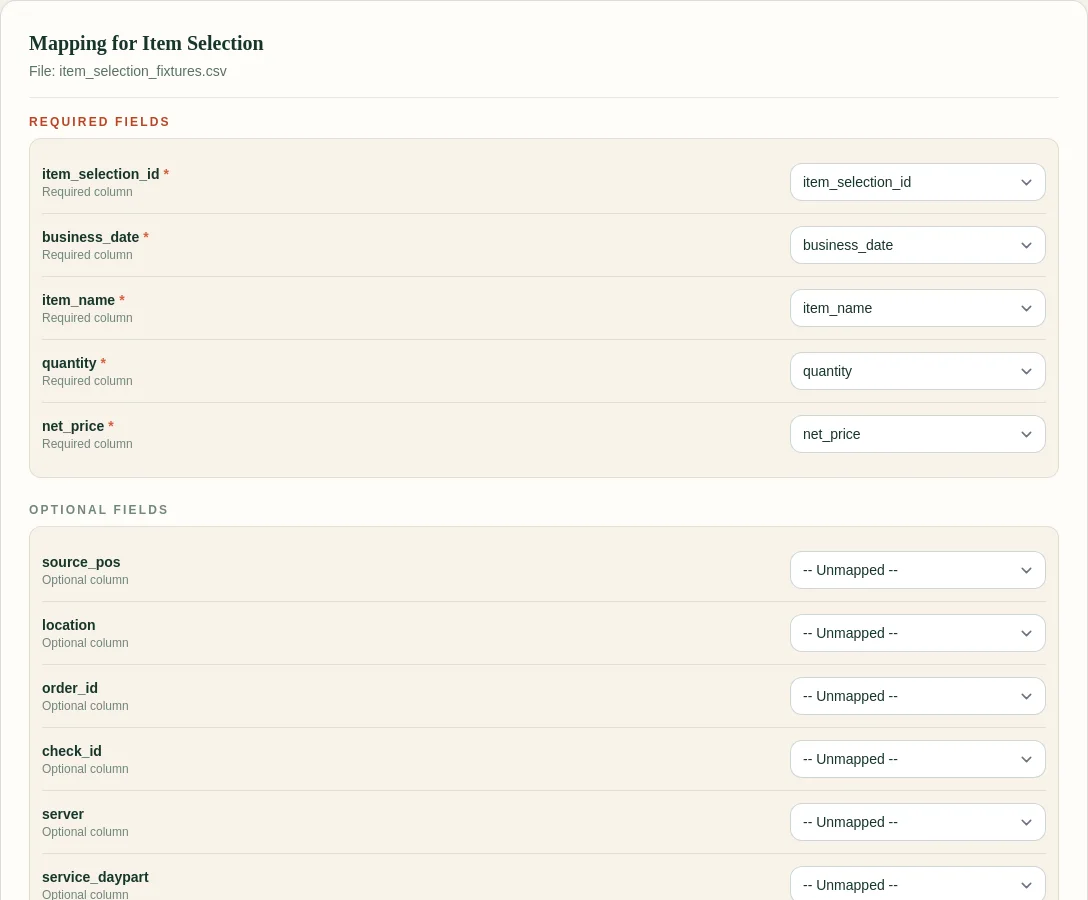
FoodSaver column mapping screen before generating a Toast workbook

The current FoodSaver generator cleans the source exports and preserves Product Mix as a source sheet. It does not yet make prep recommendations.

Free sample workbook

The template is Excel-ready and includes formula inputs plus a review-note column for chef overrides.

Pricing

FoodSaver provides three free successful workbook generations per UTC day within free limits. Pro is $19/month or $190/year, with larger limits, saved mappings, history, email delivery, and 90-day retention.

See pricing.

Frequently asked questions

How many weeks should I average?

Start with three to six comparable weekdays. Use a shorter window after major menu, hours, pricing, or demand changes.

What buffer should I use?

There is no universal percentage. Review sell-outs, leftover prep, shelf life, batch size, and service risk. Record the chosen buffer instead of hiding it in a formula.

Should modifiers become prep items?

Only when a modifier maps to a real component and the relationship is useful. Keep modifier demand separate from base entrée quantity.

Can FoodSaver produce this automatically?

Not yet. FoodSaver currently prepares a clean workbook so the source data and exceptions are reviewable before prep logic is added.

Sources

Next: compare Toast Product Mix by day of week.

Try the free Toast Prep + OneCSV workbook generator.

How to combine Toast ItemSelectionDetails and ModifierSelectionDetails

Toast’s nightly data exports can include Item Selection Details and Modifier Selection Details. The files belong together, but they cannot be stacked into one table: an item row and a modifier row represent different things.

The problem

One Item Selection is a sold menu item. One Modifier Selection is a choice attached to an item. A Burger with Extra Cheese and Bacon can therefore produce one item row and two modifier rows.

If you merge by item name, check number, timestamp, or row position, repeated items can receive the wrong modifiers. If you total both tables without a documented revenue rule, paid modifier value can be counted twice.

Example Toast CSV columns

Your configured Toast export columns may differ. Preserve the originals and map the fields needed for the relationship.

Item Selection Details

item_selection_id,business_date,item_name,quantity,net_price
item-204,2026-06-22,Burger,1,10.00

Modifier Selection Details

parent_item_selection_id,modifier_name,quantity,net_price
item-204,Extra cheese,1,2.00
item-204,Bacon,1,3.00

The safe relationship is:

Modifier.parent_item_selection_id = Item.item_selection_id

Use it only when the item ID is non-empty and unique. Duplicate item selection IDs make the relationship ambiguous.

Step-by-step Excel method

  1. Load each CSV as a separate Excel table.
  2. Keep a source row number in both tables.
  3. Check Item Selection IDs for blanks and duplicates.
  4. Use Power Query to merge the modifier table into the item table with a left outer join on the exact identifiers.
  5. Expand modifier name, quantity, and value into a detail view.
  6. Keep unmatched modifier rows in a separate query.
  7. Build item sales and modifier analysis as separate PivotTables.

Do not concatenate modifier names until after the row-level join has been checked. The detail table is easier to audit than one long text cell.

Screenshot and demo

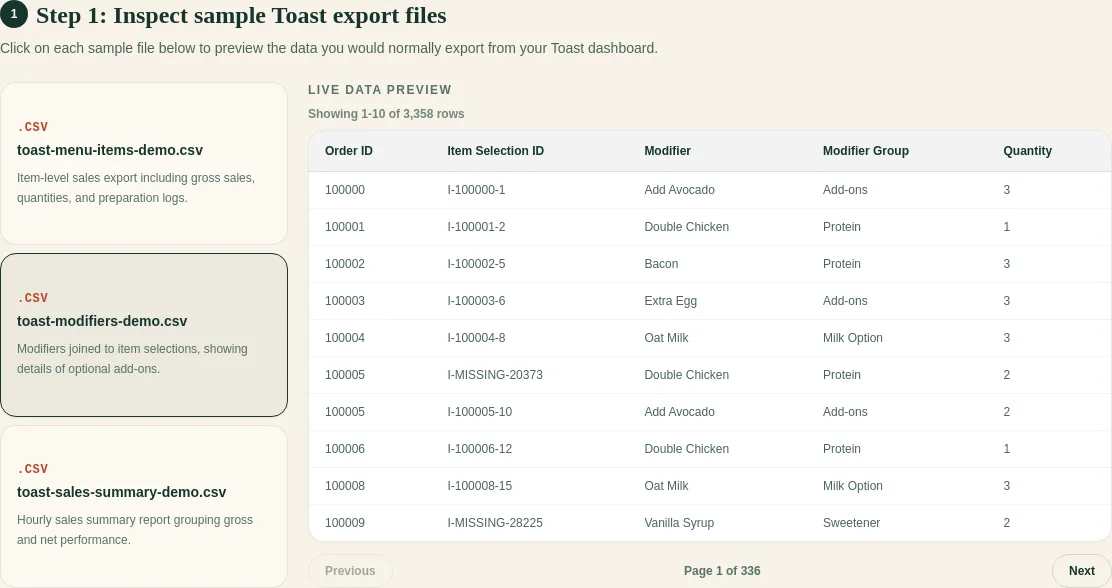
Synthetic Toast Item Selection and Modifier Selection rows in the FoodSaver preview

FoodSaver follows the same exact-ID rule and puts rows that cannot be joined in the workbook’s exception view.

Free sample workbook

Open all three in Excel to practice the join with synthetic data.

Pricing

You can generate three workbooks per UTC day for free within the free limits. FoodSaverAI Pro is $19/month or $190/year and adds larger files, saved mappings, workbook history, email delivery, and 90-day retention.

Compare Free and Pro.

Frequently asked questions

Is ItemSelectionDetails the same as Product Mix?

No. Item Selection Details is row-level. Product Mix aggregates menu-item performance for a selected period.

What if a modifier has no parent item?

Keep it unmatched with its source row. Check date coverage, location, and whether the Item Selection export is complete.

Can one item have several modifiers?

Yes. A one-to-many relationship is expected.

Should I sum item and modifier net prices?

First confirm how your configured exports represent modifier charges. Keep the two totals separate until the accounting rule is documented.

Sources

Next: clean the Toast modifier report.

Try the free Toast Prep + OneCSV workbook generator.

How to build a restaurant prep list from POS sales

POS sales can provide a demand baseline for prep. They cannot see tomorrow’s catering order, the usable chicken already in the walk-in, a changed recipe, or the chef’s batch-size constraints. A good prep worksheet makes those inputs visible.

The problem

Restaurants commonly prep from memory, last week, or a broad weekly average. Those approaches hide assumptions. A better process converts sold menu items into prep components and keeps the operator adjustments beside the formula.

Example CSV columns

Start with one row per sold item:

business_date,location,item_name,quantity_sold,voided
2026-06-01,Downtown,Chicken Bowl,38,false
2026-06-08,Downtown,Chicken Bowl,42,false

Add a separate conversion table:

menu_item,prep_item,portions_per_prep_unit,prep_unit
Chicken Bowl,Cooked chicken,4,batch
Chicken Bowl,House sauce,12,quart

Do not mix recipe definitions into the raw sales table.

The worksheet flow

  1. Select comparable operating days.
  2. Exclude or flag closures, partial services, and major promotions.
  3. Calculate an expected sold quantity per menu item.
  4. Join each menu item to its prep components.
  5. Divide demand by recipe yield.
  6. Apply a reviewed buffer.
  7. Subtract usable on-hand prep.
  8. Add confirmed catering or event quantities.
  9. Round using the kitchen’s real batch rules.
  10. Record manager overrides with a reason.
target = (expected sales ÷ recipe yield) × buffer
- usable on hand + event demand

Screenshot and demo

FoodSaver mapping screen used to confirm source POS columns

Clean inputs matter because one renamed quantity or date column can silently change the result.

Free sample workbook

The template is intentionally formula-friendly and keeps review notes beside the target.

Pricing

FoodSaver’s Toast workbook generator includes three free successful generations per UTC day within free limits. Pro is $19/month or $190/year for larger limits, history, saved mappings, email delivery, and 90-day retention.

See pricing.

Frequently asked questions

Can I use revenue instead of quantity?

Prep is normally driven by units or portions, not dollars. Price changes make revenue a poor substitute for physical demand.

How do I handle shared ingredients?

Map every relevant menu item to the shared prep component, calculate its contribution, then sum the component demand.

Should I include voids?

Keep them visible. Whether they represent actual kitchen production depends on when the void happened and the operational question.

Does this replace chef judgment?

No. It gives chef judgment a documented baseline and a place to record overrides.

Sources

Next: add a practical restaurant waste log.

Try the free Toast Prep + OneCSV workbook generator.

Toast Product Mix by day of week in Excel

A weekday PMIX view helps answer a narrow question: what usually sells on this kind of operating day? It is more useful for prep than an all-days average, provided the date coverage is honest.

The problem

Grouping sales by weekday is easy. Building a trustworthy comparison is harder. A four-Monday sample should not be compared with five Fridays as raw totals. Closed holidays should not silently behave like zero-demand days. Refunds and report definitions also need review.

Example Toast CSV columns

business_date,menu_group,item_name,quantity_sold,net_sales
2026-06-01,Entrees,Chicken Bowl,38,456.00
2026-06-08,Entrees,Chicken Bowl,42,504.00
2026-06-15,Entrees,Chicken Bowl,35,420.00

Add helper columns in Excel:

weekday = TEXT([@business_date],"dddd")
week_start = [@business_date]-WEEKDAY([@business_date],2)+1

Use a real date value, not a text label that merely looks like a date.

Build the PivotTable

  1. Put item_name in Rows.
  2. Put weekday in Columns or Filters.
  3. Put quantity_sold in Values.
  4. Show both Sum and Average.
  5. Add a distinct operating-date count outside the PivotTable if needed.
  6. Divide total quantity by included open dates for a per-day average.

Keep zero sales separate from “restaurant closed” and “missing export.” Those states mean different things.

Screenshot and demo

Synthetic Toast export preview with business dates and item rows

The preview step is where you should catch mismatched locations, periods, and file types before building the weekday table.

Free sample workbook

Download the Excel-ready weekday PMIX sample and download the prep conversion template.

The sample has three Mondays so you can compare total, average, minimum, and maximum quantities without using restaurant data.

Pricing

The FoodSaver workbook generator includes three free successful generations per UTC day within free limits. Pro costs $19/month or $190/year for larger files, saved mappings, report history, email delivery, and 90-day retention.

Review pricing.

Frequently asked questions

Does Toast PMIX already show day of week?

The Toast PMIX report supports selected date ranges and day-to-day item views, but an exported analysis may still need a weekday helper column depending on the file you downloaded.

Should holidays be included?

Flag them. Include them only when the target service is comparable.

Is average enough?

No. Review sample size, range, recent trend, sell-outs, promotions, and known events. Average is a baseline, not a forecast.

Do refunds reduce PMIX quantities?

Toast documents that menu reports, including Product Mix, are not reduced by refunds. Confirm the report behavior against the operational question you are answering.

Sources

Next: turn POS sales into a prep list.

Try the free Toast Prep + OneCSV workbook generator.