
Toast SFTP vs manual CSV exports
Manual downloads are usually the right place to prove a workflow. SFTP becomes valuable when the file set, schedule, security owner, and correction process are stable.
The problem
Teams often automate the transport before they trust the report. That replaces a visible manual task with a nightly pipeline that can quietly deliver missing, stale, or changed files.
The decision is not “modern versus old.” It is whether the recurring volume justifies key management, monitoring, retention, and re-export procedures.
Example Toast CSV columns
The transport method does not solve schema design. Whether a file is downloaded or retrieved through SFTP, confirm the configured fields:
item_selection_id,business_date,item_name,quantity,net_priceitem-204,2026-06-22,Burger,1,10.00Toast documents that automated data exports can choose the name and order of columns. That configuration can remain stable even when default web-report columns change.
Manual CSV exports
Manual downloads fit when:
- the workflow is new or occasional;
- a manager must adjust filters each run;
- prior dates are commonly corrected;
- one person can verify the file before sending it;
- the downstream workbook is still changing.
The cost is repeated labor and inconsistent naming or date selection.
Nightly SFTP exports
SFTP fits when:
- the same exports run every day;
- a technical owner can manage SSH keys;
- monitoring catches missing or late files;
- access and retention are documented;
- the team understands how corrected historical data is re-exported.
Toast notes that nightly export files reflect data as of export time. Alterations made later are not automatically reflected in a previously generated file; corrected dates may require manual report exports.
| Question | Manual | SFTP |
|---|---|---|
| Setup | Low | Higher |
| Repeated labor | Higher | Lower |
| Filter flexibility | High | Configured |
| Key management | No | Yes |
| Missing-file monitoring | Human | Must be built |
| Historical correction | Manual by nature | Requires explicit process |
Screenshot and demo
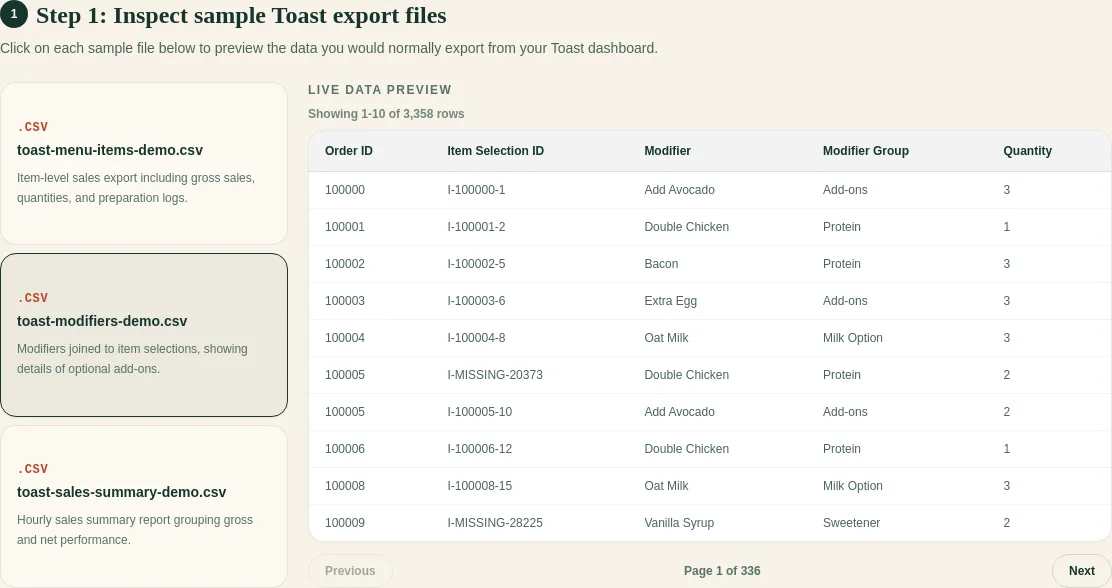
Regardless of transport, preview file type, date range, headers, and row counts before generating the weekly workbook.
Free sample workbook
Use the samples to stabilize the processing workflow before automating file delivery.
Pricing
The FoodSaver generator includes three free successful workbook generations per UTC day within free limits. Pro is $19/month or $190/year for larger limits, saved mappings, history, email delivery, and 90-day retention.
Frequently asked questions
Is Toast SFTP required for FoodSaver?
No. The current workflow accepts manually selected CSV files.
Does SFTP automatically fix changed data?
No. Toast states that later alterations are not reflected in an already created nightly export.
Who should own the SSH key?
A named technical or operations owner should control creation, storage, rotation, and revocation. Do not email private keys.
When should a small restaurant automate?
After the manual workflow is repeated, useful, and stable enough that failures can be recognized quickly.
Sources
Related: Toast export files explained.