
Weekly Toast sales review checklist for restaurant bookkeepers
The Toast Prep workbook grew from a repeated weekly task: clean the exports, check the joins, and give the owner a short list of rows that need attention.
- What sold?
- Which modifiers changed the order?
- Which totals need a second look?
- What should the owner or general manager check next?
If you already work from Toast reports and Excel, this checklist keeps the review tight.
Download the printable weekly review checklist
1. Start with the right Toast exports
For an item-level sales review, start with Item Selection. Add Modifier Selection when you need to understand add-ons, substitutions, combos, or customizations.
Keep the original exports unchanged. Save a clean copy of the workbook you send to the owner, but keep the source files available until the review is closed.

Need help choosing the files? Read Item Selection vs Modifier Selection.
2. Confirm the reporting period
Before reviewing sales, confirm that all exports cover the same dates and locations.
Check:
- start and end dates;
- restaurant location;
- service periods;
- whether voids, refunds, or comps are included;
- whether the export was pulled before the POS day fully closed.
Small date mismatches can make the rest of the review look wrong.
3. Review item sales before modifiers
Item Selection is the base grain for the review. Treat each row as one item selection from the Toast export.
Look for:
- high-selling items;
- zero or negative values;
- unusually high discounts;
- voided items;
- duplicate-looking rows;
- missing item names or menu groups.
Do this before adding modifiers. It gives you a stable base total.
4. Join modifiers carefully
Join Modifier Selection when the item selection identifier is exact and unique. Keep unmatched modifiers visible as exceptions.
This matters because modifier rows can be easy to misread. Some reports show modifier prices. Some show context that should not be added to item revenue again.
See the numeric walkthrough in how to avoid double-counting Toast modifier revenue.
5. Keep exceptions visible
Keep messy rows available for review.
Common exceptions include:
- unmatched modifiers;
- duplicate source rows;
- invalid or missing values;
- voided selections;
- rows outside the expected period;
- columns that changed names between exports.
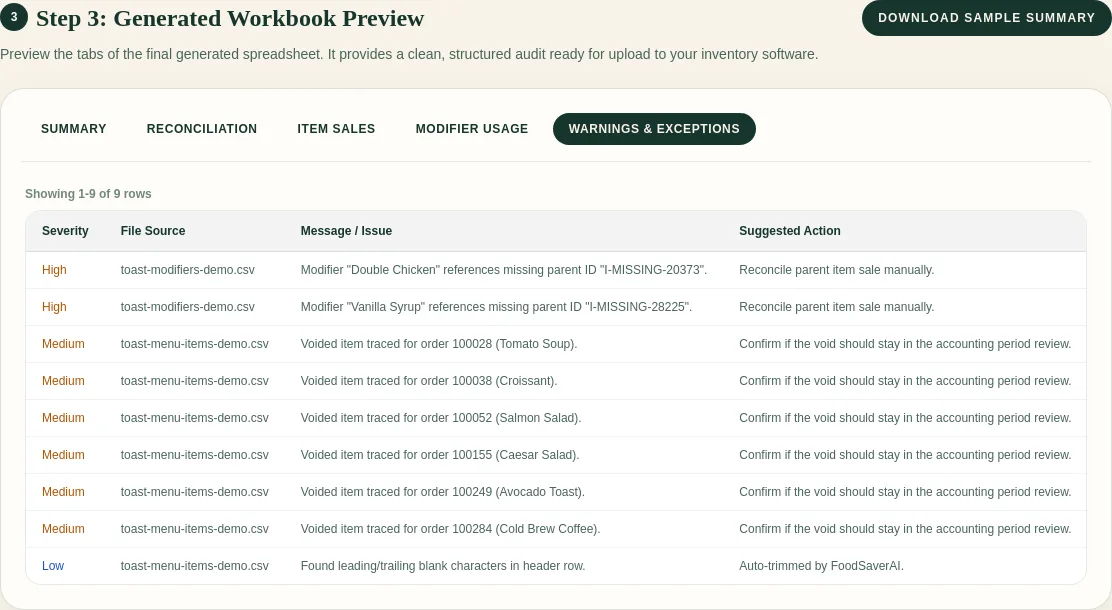
The owner needs the exception count and the questions that require a decision. The workbook can hold the row-level evidence.
6. Send a short owner summary
Keep the summary plain:
- what files were processed;
- what period they cover;
- the biggest sales or modifier patterns;
- exceptions that need review;
- the next three checks.
Tie each statement to the source data. This export supports sales review and exception handling; prep, staffing, and purchasing need additional evidence.
Owner email template
Hi [name],
I reviewed the Item Selection and Modifier Selection exports for [location].
Ready to review
- [top item or sales observation]
- [modifier or discount observation]
Please check
- [exception category and count]
- [void, duplicate, or unmatched modifier question]
The workbook includes the source references for each exception.
Thanks,
[name]
7. Save the mapping for next week
If the Toast export headers stay the same, saved mappings can save time. If the headers change, review the mapping again.
A good weekly process is repeatable:
- Export files from Toast.
- Confirm columns.
- Generate the workbook.
- Review exceptions.
- Send the owner summary.
FoodSaver follows that same flow. Upload Toast exports, confirm the columns, and generate an Excel workbook with source rows, modifier joins, and exceptions ready to review.
Where FoodSaver fits
FoodSaver previews the selected CSV files, confirms the column mapping, and generates item, modifier, reconciliation, and exception views. You still confirm the reporting period, resolve accounting questions, and write the owner summary.
Frequently asked questions
How often should I run this review?
Weekly is a useful starting point for owner reporting and repeated cleanup. Month-end reviews can use the same workflow with a longer period.
Should I edit the original CSV files?
Keep the original exports unchanged. Record corrections and annotations in the review workbook so you can trace each decision.
What if Toast changes a column name?
Review the mapping again. Saved mappings should only apply to the exact same header signature.