Skip to content

Blog

Toast vs Square for small restaurants: POS data and prep planning

Choosing a Point of Sale (POS) system is one of the most critical decisions for a small food and beverage business. Toast and Square are the two dominant platforms in the independent restaurant space. While both process payments and send orders to the kitchen, their reporting structures, export capabilities, and how they assist in daily prep planning differ significantly.

Square POS: simplicity and low barrier to entry

Square is famous for its ease of use and zero monthly fee software option. For small bakeries, pop-ups, and coffee shops, it represents a straightforward solution:

  • Hardware flexibility: Square runs on iPads, iPhones, and proprietary registers, with affordable plug-in readers.
  • Flat-rate pricing: Pay a percentage of card transactions, with no monthly base software fees for the standard tier.
  • Simplified reporting: Square provides high-level sales summaries, item sales reports, and basic category breakdowns.

However, Square’s CSV exports are relatively flat. If your menu relies heavily on complex modifier configurations (e.g., customized breakfast sandwiches, espresso drink options), analyzing how modifiers contribute to ingredient usage in Square requires manual work.

Toast POS: built specifically for foodservice

Toast is designed from the ground up for restaurants, cafes, and bakeries. It does not serve retail shops or beauty salons. Key aspects include:

  • Advanced table and menu management: Built to handle complex coursing, seat numbers, and kitchen display screens.
  • Detailed item and modifier separation: Toast exports distinct files for Item Selection Details and Modifier Selection Details, allowing operators to track exactly which modifiers were sold with which items.
  • Granular PMIX (Product Mix) reports: Provides deep insight into sales by hour, day of the week, and kitchen station.

The tradeoff is pricing. Toast typically carries monthly software subscription fees per terminal, plus hardware setup costs, making it a larger financial commitment for an early-stage kitchen.

POS data and daily kitchen prep

Neither Toast nor Square natively generates a dynamic kitchen prep sheet telling your prep cooks exactly how many units of an item or modifier to prepare each morning based on current inventory and waste logs. To do this, owners must export sales CSV files and manually compute the math in a spreadsheet.

If you want to turn your Toast or Square sales export CSV files into a clean daily prep plan and track high-waste inventory items without setting up complex software, FoodSaver offers a lightweight, budget-friendly tool to automate the process.
xtraCHEF vs FoodSaver for small kitchens: AP automation vs quick prep

Independent restaurant operators looking to optimize their food costs often evaluate inventory and kitchen management software. Two options that serve very different operational scopes are xtraCHEF (by Toast) and FoodSaver. Understanding their differences is essential for choosing the right tool without over-complicating your kitchen workflows.

xtraCHEF: the full back-office suite

xtraCHEF is a comprehensive back-office platform designed for medium-to-large restaurant groups. It focuses on accounts-payable automation and full inventory control:

  • Accounts Payable (AP) automation: Scan paper invoices with OCR technology to automatically log prices and sync them with accounting software like QuickBooks.
  • Recipe costing: Dynamically track how ingredient price fluctuations affect the cost of individual menu items.
  • Theoretical inventory: Track exact food usage by linking raw ingredient shipments to POS sales to calculate theoretical vs. actual waste.

While powerful, xtraCHEF requires a significant time commitment. Staff must scan every single invoice, keep recipe ingredient weights accurate, and conduct regular physical inventory counts for hundreds of raw ingredients.

FoodSaver: prep planning and key item tracking

FoodSaver addresses a different problem: the need for a simple, fast workflow that busy kitchen staff can actually maintain without heavy administrative overhead.

  • POS export preprocessing: Automatically parse and format raw sales exports from Toast or Square.
  • Key item tracking: Focus inventory counting only on the 10 to 30 high-waste items that drive daily prep and ordering decisions (e.g., proteins, baked goods, prepared sauces).
  • Daily prep schedule generation: Use current inventory levels and historical sales trends to auto-generate daily prep and bake targets.

FoodSaver does not scan paper invoices, manage accounts payable, or calculate plate-level recipe costs. It is built strictly to prevent overproduction and spoilage on a shift-by-shift basis.

Comparative summary

Workflow FeaturextraCHEFFoodSaver
Invoice OCR & AP syncYesNo
Recipe costing & plate marginsYesNo
Raw ingredient stock countsHundreds of items10-30 key items
Daily prep list generationNoYes
Setup timeWeeksMinutes

If you need a simple tool to track your highest-waste items and turn Toast or Square POS reports into automated daily prep sheets without the overhead of a full back-office system, FoodSaver provides a lightweight, focused alternative.

Toast export files explained: Item, Modifier, PMIX, Order, and Payment

Toast provides report downloads and configurable nightly data exports. The file names sound related, but each answers a different operational or financial question.

The problem

Spreadsheet errors often begin before a formula is written: the wrong file is used for the question. Product Mix is treated as row-level sales. Payment rows are joined directly to menu items. Modifier rows are stacked under item rows.

Start by naming the grain: what does one row represent?

Example Toast CSV columns

ExportOne row usually representsUseful examples
Item Selection DetailsOne menu-item selectionItem ID, date, item, quantity, net price
Modifier Selection DetailsOne modifier selectionParent item ID, modifier, quantity, value
Product MixAn item aggregate for a period or breakdownMenu, group, item, quantity, sales
Order DetailsOne orderOrder ID, opened/closed times, dining option
Payment DetailsOne paymentPayment ID, order/check ID, type, amount
MenuMenu configuration dataItem, group, identifiers, active state

Toast allows configured nightly exports to choose column names and order. Never assume every restaurant receives the same schema.

Which file should you use?

  • “What sold?” Start with Item Selection Details.
  • “Which add-ons were selected?” Add Modifier Selection Details.
  • “What is the item mix for a period?” Use Product Mix.
  • “How were orders opened, closed, or categorized?” Use Order Details.
  • “How was money tendered?” Use Payment Details.
  • “How is the menu configured?” Use Menu data.

When a question crosses grains, define the join and reconciliation before combining files.

Screenshot and demo

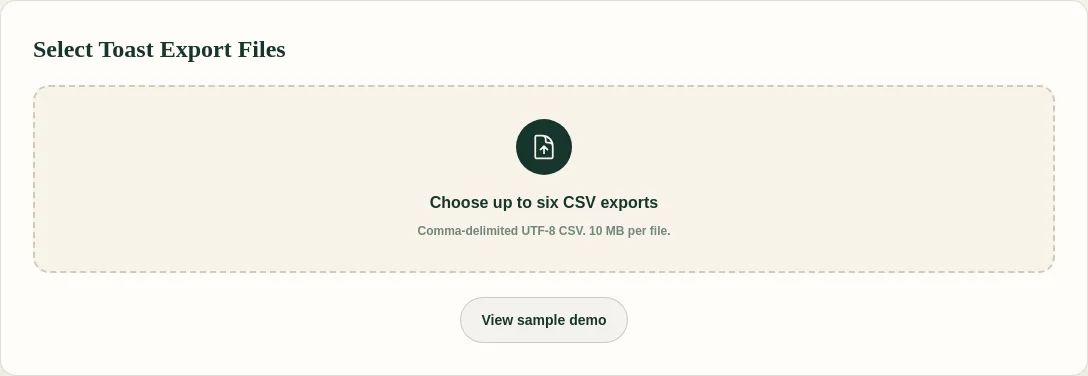
FoodSaver upload screen for supported Toast CSV exports

FoodSaver requires Item Selection for the clean item workbook. Other supported files are optional; Product Mix, Order, Payment, and Menu are currently preserved as sanitized source sheets rather than fully normalized semantics.

Free sample workbook

The sample files make the item-versus-modifier grain visible before you use restaurant exports.

Pricing

FoodSaver offers three free successful generations per UTC day within free limits. Pro costs $19/month or $190/year and adds larger files, history, saved mappings, email delivery, and 90-day retention.

See plan details.

Frequently asked questions

Are nightly exports the same as manual report downloads?

Toast says nightly data exports cover many of the same data types available from Toast Web, but configured columns and timing can differ.

Can I combine every export in one worksheet?

Use one workbook, not one undifferentiated table. Separate sheets preserve row grain and reduce accidental duplication.

Why does my coworker’s export have different columns?

Configured exports can choose column names and order. Report filters and versions can also affect downloads.

Which file does FoodSaver require?

Item Selection Details. Modifier Selection is optional but needed for item-modifier detail.

Sources

Next: compare Toast SFTP with manual CSV exports.

Try the free Toast Prep + OneCSV workbook generator.

MarginEdge alternative for small restaurants: full platform or focused workbook?

MarginEdge and FoodSaver solve problems at very different depths. MarginEdge is a broad restaurant management platform. FoodSaver is a focused Toast export cleanup and workbook tool.

The problem

“MarginEdge alternative” can mean “I need another complete back-office system” or “I do not need a complete back-office system yet.” Small restaurants should separate those questions before comparing monthly prices.

What MarginEdge includes

MarginEdge’s official pages describe invoice processing, bill pay, inventory, recipe management, price alerts, ordering, daily reporting, and comparisons of purchases, sales, inventory, and waste.

Its public pricing page listed $350 per location per month for MarginEdge and $500 per location per month with the Freepour bundle when reviewed on June 23, 2026. The same page notes additional Toast subscription requirements for Toast API integrations. Verify current pricing and terms directly before purchasing.

What FoodSaver includes

FoodSaver handles a narrower workflow:

  • select supported Toast CSV exports;
  • preview and confirm file types;
  • confirm required columns;
  • create exact item-modifier joins;
  • keep exceptions and source references visible;
  • generate an Excel workbook for review.

It does not process invoices, pay bills, maintain inventory, manage recipes, or calculate a daily P&L.

Example Toast CSV columns

item_selection_id,business_date,item_name,quantity,net_price
item-204,2026-06-22,Burger,1,10.00

This is enough to begin an item-level sales review. It is not enough for actual food cost, because that requires purchasing, recipe, inventory, and waste data.

Decision table

Primary jobBetter fit
Invoice capture and codingMarginEdge-class platform
Bill pay and accounting syncMarginEdge-class platform
Inventory and recipe managementMarginEdge-class platform
Purchase-versus-sales usage analysisMarginEdge-class platform
Clean Toast exports into ExcelFoodSaver or manual Excel
Validate a recurring cleanup workflow cheaplyStart focused

The larger platform may be better value when several modules replace real labor. The smaller tool may be better when only one annoying workflow has been validated.

Screenshot and demo

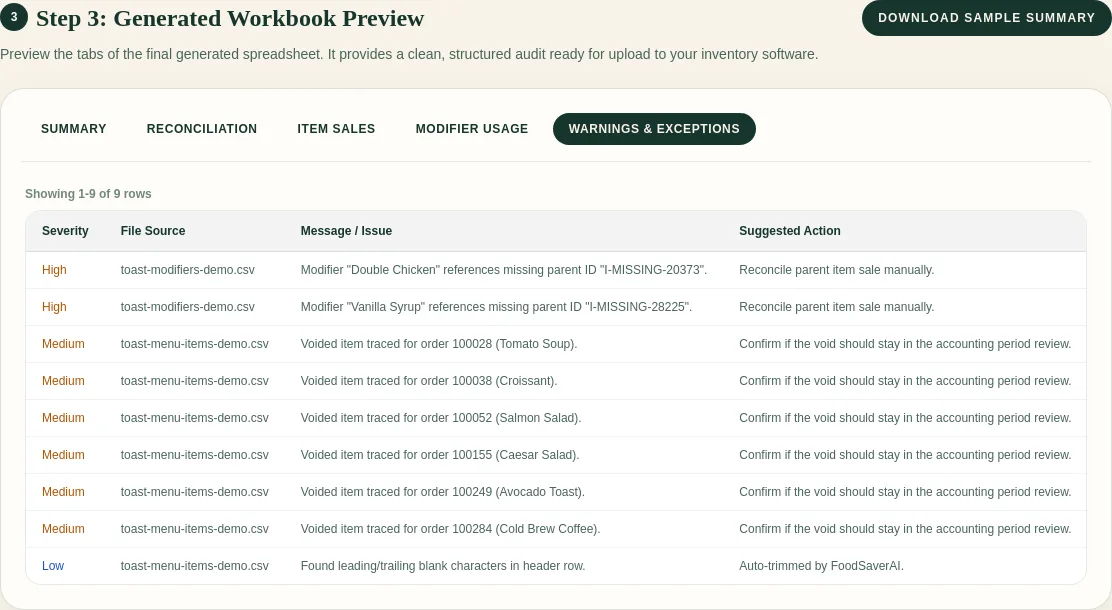
FoodSaver workbook exception preview with synthetic Toast rows

Open the FoodSaver demo to test the narrower workflow before treating it as a platform comparison.

Free sample workbook

Pricing

FoodSaver includes three free successful generations per UTC day within free limits. Pro is $19/month or $190/year. MarginEdge’s official page listed the per-location prices above as of June 23, 2026; confirm current pricing and integration costs with MarginEdge.

See FoodSaver pricing.

Frequently asked questions

Is FoodSaver a MarginEdge replacement?

No. It replaces only a narrow manual export-cleanup task, not the broader back-office platform.

Which is better for inventory?

MarginEdge documents inventory, recipe, purchasing, and usage capabilities. FoodSaver does not currently provide inventory management.

Why compare them at all?

Because a restaurant searching for an alternative may be deciding between a full system and a smaller validated workflow, not between identical products.

Can Toast CSVs produce actual food cost?

Not alone. Actual food cost needs purchases and inventory; theoretical usage also needs maintained recipes and PMIX mappings.

Sources

Also compare the xtraCHEF alternative decision.

Try the free Toast Prep + OneCSV workbook generator.

Restaurant waste log template: fields, reasons, and weekly review

The best waste log is not the most elaborate. It is the one the team completes consistently and the manager actually reviews.

The problem

A weekly “waste: $240” entry cannot show whether the kitchen overprepped, received damaged product, held inventory too long, or lost ingredients to spoilage. At the other extreme, a form with twenty required fields slows service and produces guesswork.

Capture the physical event first. Apply costs and analysis during review.

Example CSV columns

business_date,location,shift,waste_item,quantity,unit,reason,source,estimated_unit_cost,estimated_waste_cost,recorded_by,review_note
2026-06-22,Downtown,Dinner,Spinach,3,tubs,Overproduction,Prep,4.20,12.60,AB,Compare with Monday prep target

Required during service:

  • Date and shift: When did the waste occur?
  • Item: The specific ingredient or batch (e.g., spinach, cooked chicken).
  • Quantity and unit: How much was discarded?
  • Reason: Why was it wasted?
  • Initials: Who recorded the entry?

Useful during manager review:

  • Source or station: Where did the waste originate?
  • Current unit cost: Standard cost for the item.
  • Estimated waste cost: Calculated value (quantity * unit cost).
  • Follow-up note: Actionable review notes.

Keep reason codes consistent

Use a short list such as overproduction, spoilage, receiving damage, quality hold, dropped/spilled, incorrect order, prep error, yield variance, and other. Train the team on examples. “Other” should require a brief note.

Free sample workbook

Download the Excel-ready restaurant waste log template.

It includes three synthetic events and opens in Excel or Google Sheets. Replace the examples and protect your reason-code list from casual edits.

Review it with prep targets

Each week:

  1. Total waste by item and reason.
  2. Compare overproduction with prep targets.
  3. Compare spoilage with ordering and receiving.
  4. Identify recurring shifts or stations.
  5. Confirm unit costs.
  6. Choose one or two actions (e.g., adjust spinach prep target down by 1 tub).
  7. Check whether the action changed the next period.

Recorded waste is not proof that no other waste occurred. Track completion habits alongside the dollars.

For bakeries and cafes, connect the log to your prep targets so repeated pastry, dough, filling, or produce waste changes the next production plan.

Simplify with FoodSaver

If you do not want to maintain this in a spreadsheet, FoodSaver tracks key items, use-first batches, prep gaps, buy-next items, and waste logs in one daily workflow. FoodSaver keeps your team aligned on what to prep, what to use first, and what got wasted, without requiring complex POS setup or heavy inventory software.

Review FoodSaver features and pricing.

Frequently asked questions

Should the log track employee names?

Initials can help follow-up, but the purpose should be process improvement, not automatic blame. Follow local privacy and employment practices.

How precise should cost be?

Use a reviewed current estimate and label it as estimated. Do not delay the physical entry while looking for an invoice.

Should plate comps be included?

Define the boundary. Some teams log physical food loss here and review comps or discounts separately from POS data.

Can FoodSaver import this waste log?

FoodSaver has a built-in waste logging workflow designed for quick mobile entry in the kitchen. Rather than importing spreadsheets, you can log waste events directly into your kitchen dashboard.

Sources