
How to combine Toast ItemSelectionDetails and ModifierSelectionDetails
Toast’s nightly data exports can include Item Selection Details and Modifier Selection Details. The files belong together, but they cannot be stacked into one table: an item row and a modifier row represent different things.
The problem
One Item Selection is a sold menu item. One Modifier Selection is a choice attached to an item. A Burger with Extra Cheese and Bacon can therefore produce one item row and two modifier rows.
If you merge by item name, check number, timestamp, or row position, repeated items can receive the wrong modifiers. If you total both tables without a documented revenue rule, paid modifier value can be counted twice.
Example Toast CSV columns
Your configured Toast export columns may differ. Preserve the originals and map the fields needed for the relationship.
Item Selection Details
item_selection_id,business_date,item_name,quantity,net_priceitem-204,2026-06-22,Burger,1,10.00Modifier Selection Details
parent_item_selection_id,modifier_name,quantity,net_priceitem-204,Extra cheese,1,2.00item-204,Bacon,1,3.00The safe relationship is:
Modifier.parent_item_selection_id = Item.item_selection_idUse it only when the item ID is non-empty and unique. Duplicate item selection IDs make the relationship ambiguous.
Step-by-step Excel method
- Load each CSV as a separate Excel table.
- Keep a source row number in both tables.
- Check Item Selection IDs for blanks and duplicates.
- Use Power Query to merge the modifier table into the item table with a left outer join on the exact identifiers.
- Expand modifier name, quantity, and value into a detail view.
- Keep unmatched modifier rows in a separate query.
- Build item sales and modifier analysis as separate PivotTables.
Do not concatenate modifier names until after the row-level join has been checked. The detail table is easier to audit than one long text cell.
Screenshot and demo
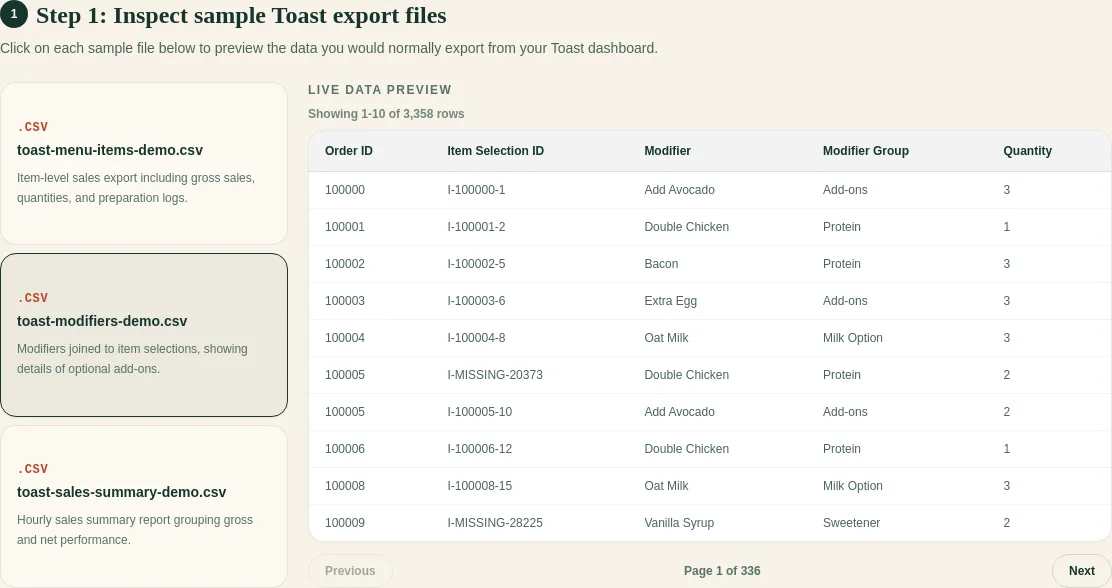
FoodSaver follows the same exact-ID rule and puts rows that cannot be joined in the workbook’s exception view.
Free sample workbook
- Download sample Item Selection CSV
- Download sample Modifier Selection CSV
- Download the joined cleanup template
Open all three in Excel to practice the join with synthetic data.
Pricing
You can generate three workbooks per UTC day for free within the free limits. FoodSaverAI Pro is $19/month or $190/year and adds larger files, saved mappings, workbook history, email delivery, and 90-day retention.
Frequently asked questions
Is ItemSelectionDetails the same as Product Mix?
No. Item Selection Details is row-level. Product Mix aggregates menu-item performance for a selected period.
What if a modifier has no parent item?
Keep it unmatched with its source row. Check date coverage, location, and whether the Item Selection export is complete.
Can one item have several modifiers?
Yes. A one-to-many relationship is expected.
Should I sum item and modifier net prices?
First confirm how your configured exports represent modifier charges. Keep the two totals separate until the accounting rule is documented.