
Free Toast Prep + OneCSV workbook generator
Turn separate Toast exports into one workbook you can review before using the numbers. FoodSaver accepts Item Selection Details as the required source and can add Modifier Selection Details, Product Mix, Order Details, Payment Details, and Menu exports.
Free workbook generator
Clean the files first. Keep every exception visible.
The problem
Toast data exports are useful, but they do not all describe the same thing. Item rows, modifier rows, payments, orders, and Product Mix summaries have different grains. Pasting them into one sheet can duplicate revenue, detach modifiers from their items, or hide source rows that need review.
The generator keeps those concerns separate:
- Preview each selected CSV.
- Confirm its file type and required column mapping.
- Join modifiers only through an exact parent Item Selection identifier.
- Generate an Excel workbook with clean sheets, source references, and an Exceptions sheet.
It does not guess missing relationships. It also does not make prep or forecasting recommendations.
Example Toast CSV columns
Toast lets restaurants configure the columns and order used by automated data exports, so headers can differ. FoodSaver asks you to confirm mappings instead of assuming one universal layout.
| File | Useful source columns | Workbook use |
|---|---|---|
| Item Selection Details | Item Selection Id, Business Date, Menu Item, Quantity, Net Price | Base item-level sales |
| Modifier Selection Details | Parent Item Selection Id, Modifier, Quantity, Net Price | Exact modifier attachment |
| Product Mix | Menu Group, Menu Item, Quantity, Net Sales | Preserved source sheet |
| Order Details | Order Id, Check Id, Opened, Closed | Preserved source sheet |
item_selection_id,business_date,item_name,quantity,net_priceitem-204,2026-06-22,Burger,1,10.00Screenshot and demo
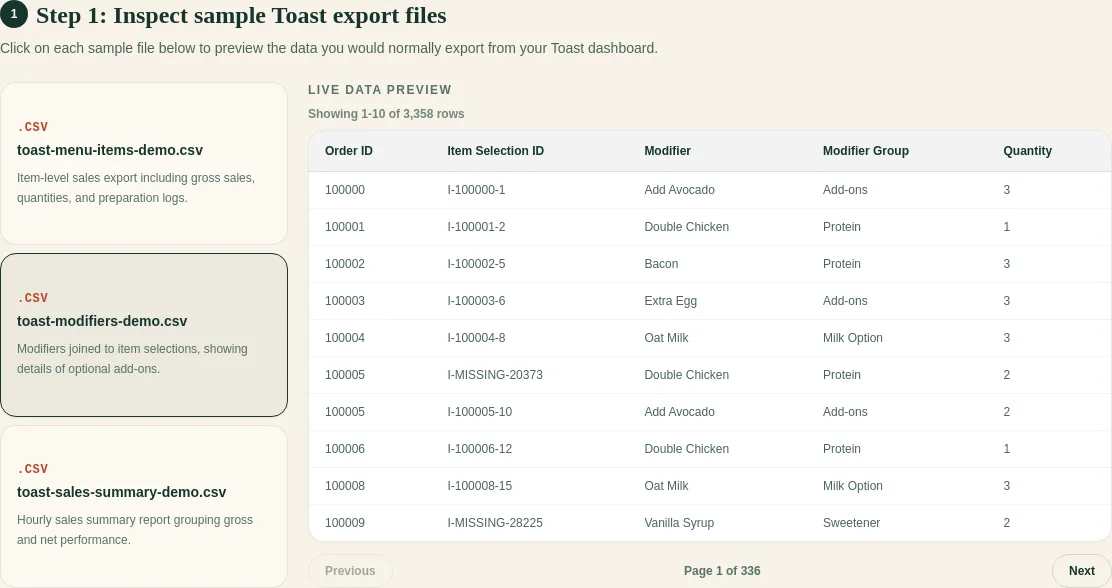
The public demo uses synthetic restaurant data. It shows file preview, column mapping, and the exception review without exposing a restaurant’s files.
Open the interactive Toast Prep demo.
Free sample workbook
The sample workbook is represented here as the exact Excel-ready inputs and output previews, so you can inspect the grain before using your own files:
- Download sample Item Selection CSV
- Download sample Modifier Selection CSV
- Download the modifier cleanup sheet template
- See the generated-workbook exception preview
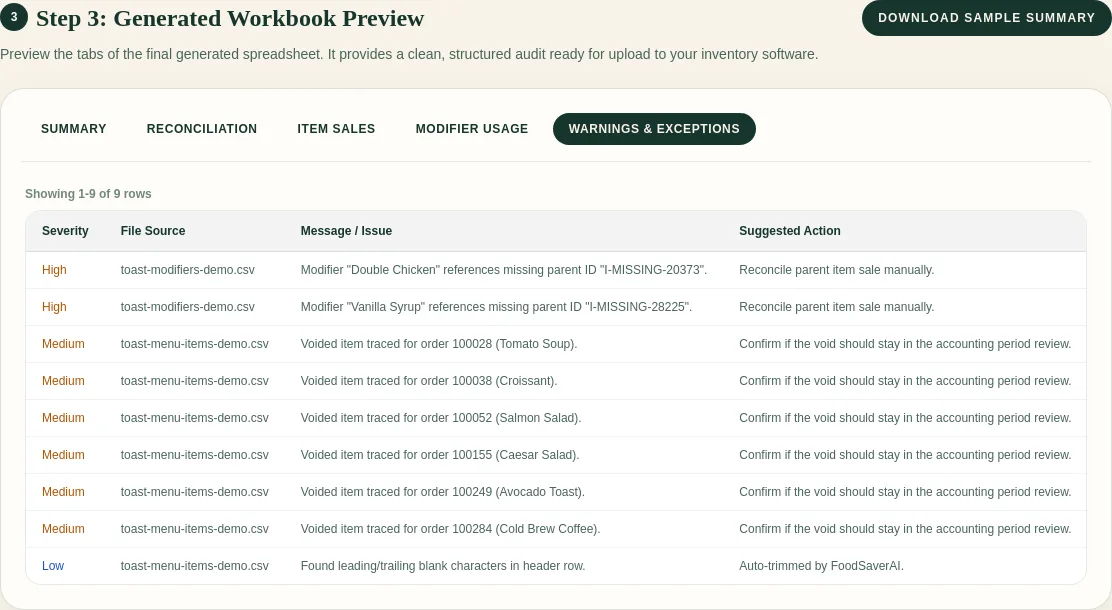
CSV templates open directly in Excel or Google Sheets. The generator produces
the multi-sheet .xlsx workbook.
What the workbook contains
- a report sheet with the source manifest and confirmed mappings;
- clean item sales at one row per Item Selection;
- clean modifier sales;
- item-to-modifier detail based on exact identifiers;
- reconciliation counts;
- visible exceptions such as unmatched modifiers, duplicate identifiers, invalid values, and voided rows;
- sanitized passthrough sheets for supported optional files.
Pricing
Free use includes three successful workbook generations per UTC day, up to 10 MB per file, 25 MB total, and 10,000 rows per file. Free source files are removed after the short-lived workbook response completes.
FoodSaverAI Pro is $19/month or $190/year during the alpha. It adds larger limits, report history, saved exact-header mappings, email delivery, and 90-day source and workbook retention.
Frequently asked questions
Which Toast file is required?
Item Selection Details is required because it provides the item-level base. Modifier Selection Details and the other supported exports are optional.
Does FoodSaver change my original CSV files?
No. The server validates the original files and creates a new workbook. Keep your source exports unchanged for audit and reprocessing.
Can the tool build a prep list from PMIX today?
Not yet. The current generator cleans and organizes supported exports. PMIX weekday analysis and prep calculations are separate workflows planned after the reliable workbook foundation.
Is this an official Toast product?
No. FoodSaver is an independent tool and is not affiliated with or endorsed by Toast. Toast product names are used to identify compatible exports.
Sources and methodology
These pages use synthetic examples and document where operator review is still required.
Ready to turn the exports into one reviewable workbook?