
Toast PMIX to prep list worksheet
A useful prep list starts with sales history, then adds recipe yields, on-hand inventory, scheduled events, and a chef-approved buffer. PMIX is evidence—not a complete prep decision.
PMIX worksheet
Clean your Toast exports before calculating prep.
The problem
A Product Mix export tells you how many menu items sold over a selected period. A cook needs ingredient or batch quantities for a particular service. The missing bridge is a maintained conversion table:
menu item sold → prep component → recipe yield → quantity to prepareUsing one busy day as the forecast creates overproduction. Averaging all days together can hide Monday-versus-Friday behavior. Treating modifiers as separate entrées can inflate demand.
Example Toast CSV columns
PMIX exports vary with report configuration. Preserve the original headers and identify at least:
| Column | Why it matters |
|---|---|
| Business Date | Assigns sales to the operating day |
| Menu Group | Keeps like items together |
| Menu Item | Joins to your recipe or prep map |
| Quantity | Provides item demand |
| Net Sales | Useful for sales review, not prep quantity |
business_date,menu_group,item_name,quantity_sold,net_sales2026-06-22,Entrees,Chicken Bowl,38,456.00A practical calculation
If 38 Chicken Bowls sold and one batch of cooked chicken yields four portions:
38 portions ÷ 4 portions per batch = 9.5 base batches9.5 × 1.10 buffer = 10.45 target batchesDo not silently round that to 11. Show the decimal, the chosen rounding rule, and the person who approved it. Then subtract usable on-hand prep and add known catering or event demand.
Screenshot and demo
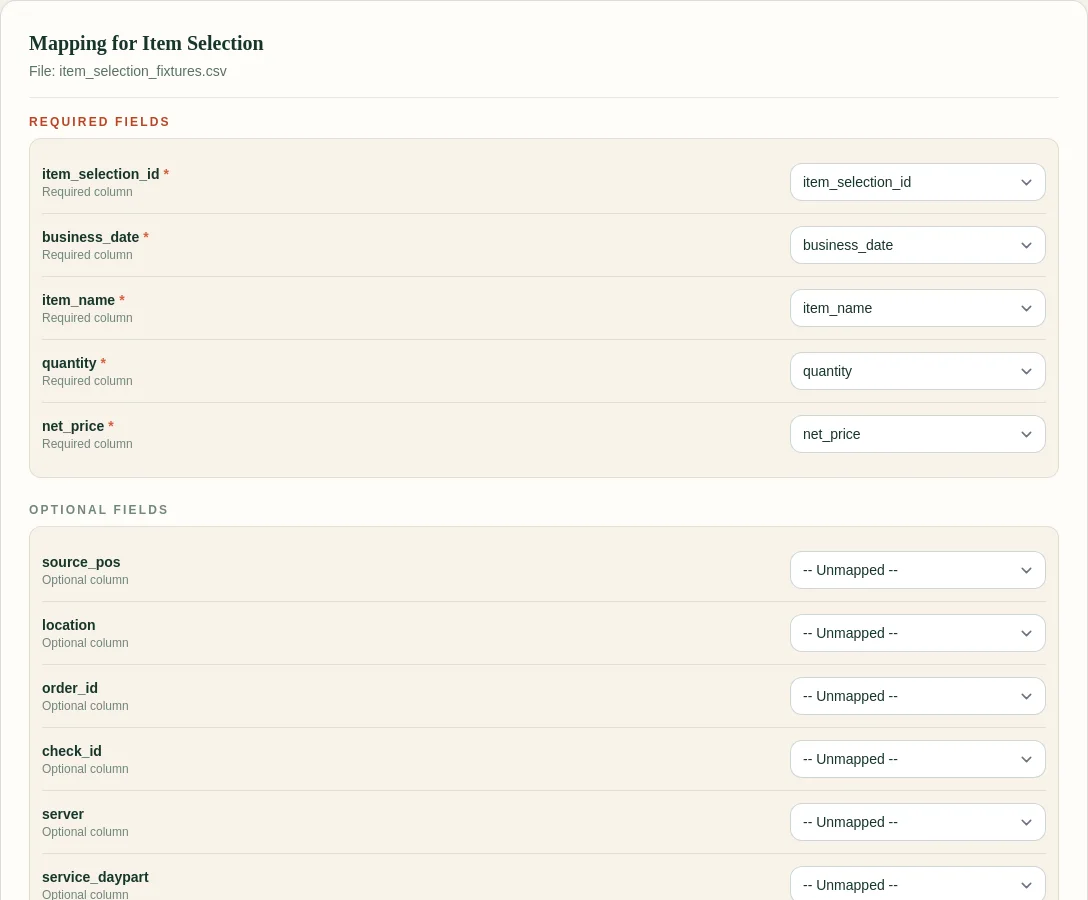
FoodSaver currently helps normalize and review the source exports. The prep formula remains an operator-reviewed worksheet rather than an automatic recommendation.
Free sample workbook
- Download the Excel-ready prep list template
- Download sample weekday PMIX rows
- View the Toast workbook demo
The template includes source item, units sold, recipe yield, base quantity, buffer, target quantity, unit, and review note.
Pricing
The Toast Prep + OneCSV generator is free for three successful generations per UTC day within free file and row limits. Pro is $19/month or $190/year and adds larger limits, history, saved mappings, email delivery, and 90-day retention.
Frequently asked questions
Does Toast PMIX include ingredient quantities?
No. PMIX reports menu-item quantities. Ingredient or batch quantities require a recipe or prep conversion maintained by the restaurant.
Should I use average sales or the most recent day?
Compare matching weekdays over several recent weeks, then review holidays, weather, promotions, catering, menu changes, and current on-hand quantity.
Does FoodSaver generate prep recommendations now?
No. The current tool creates a clean, reviewable workbook. This worksheet helps you structure the next calculation without presenting it as a prediction.
How should modifiers affect prep?
Use modifier quantities only when they represent a real prep component and can be attached safely. Do not add every modifier row to entrée demand.
Sources and methodology
Start with clean source rows and visible exceptions.