
Free restaurant waste log template
A waste log should be fast enough to use during service and specific enough to support a weekly decision. This template records what was lost, why, and what the team should check next.
The problem
Writing “food waste” as one weekly dollar value does not tell a chef whether the cause was overproduction, spoilage, a quality hold, a dropped plate, a recipe mistake, or receiving damage. An oversized form, however, gets ignored.
Use a short row-level log at the moment waste happens. Review patterns later with sales, prep, purchasing, and inventory data.
Example CSV columns
| Column | What to record |
|---|---|
| Business Date | Restaurant operating date |
| Location and Shift | Where and when waste occurred |
| Waste Item | Ingredient, prep batch, or menu item |
| Quantity and Unit | 3 lb, 4 each, 2 portions |
| Reason | A small, consistent reason list |
| Source | Prep, line, inventory, receiving, or plate |
| Estimated Unit Cost | Known or reviewed estimate |
| Review Note | One concrete follow-up |
business_date,waste_item,quantity,unit,reason,estimated_waste_cost2026-06-22,Chicken breast,3,lb,Overproduction,12.60Recommended reason codes
- overproduction;
- spoilage;
- receiving damage;
- quality hold;
- dropped or spilled;
- incorrect order;
- recipe or prep error;
- trim or yield variance;
- other, with a short note.
Keep the list small enough that two managers classify the same event similarly.
Screenshot and demo
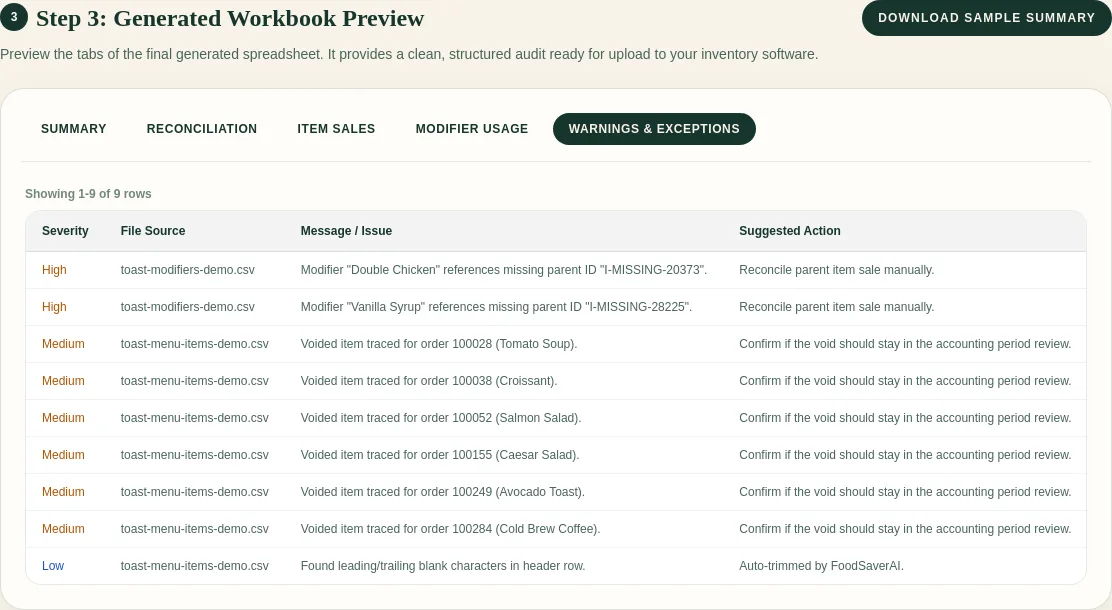
The screenshot demonstrates the same design principle used by the waste log: keep questionable rows visible and give each one a next action.
Free sample workbook
Download the Excel-ready restaurant waste log template.
The sample contains synthetic rows only. Open it in Excel or Google Sheets, replace the examples, and add data validation for your restaurant’s reason codes if desired.
Weekly review
Group waste by item, reason, shift, and source. Then ask:
- Is one item repeatedly overproduced on the same weekday?
- Did spoilage rise after a purchasing or receiving change?
- Are quality holds concentrated in one station or shift?
- Does the estimated cost use a current unit cost?
- Is the waste log complete enough to compare with prep and PMIX?
Do not treat recorded waste as total waste. It is the portion the team captured.
Pricing
The waste log template is free. FoodSaver’s Toast Prep + OneCSV generator also offers three free successful workbook generations per UTC day. Pro is $19/month or $190/year for larger limits, history, saved mappings, email delivery, and 90-day retention.
Frequently asked questions
Should employees enter cost during service?
Usually no. Capture item, quantity, unit, and reason quickly. A manager or bookkeeper can apply reviewed unit costs later.
Should I log trim?
Log unexpected trim or yield variance. Normal recipe yield can stay in the recipe standard unless you are measuring it deliberately.
Can POS sales show waste by themselves?
No. Sales show what was sold. Waste needs a separate observation, then can be compared with sales, purchases, and inventory.
Does FoodSaver calculate waste opportunities now?
No. The current generator cleans and organizes Toast exports. This template is a separate operator input for future review.
Sources and methodology
Pair the waste log with clean weekly sales exports.